

When a page refuses to index, impressions drop, rankings disappear, and organic growth stops immediately.
In 2026, when Google’s AI systems (SGE) prioritize clarity, structure, and trust, indexing issues have become one of the most common SEO problems.
At Chapters Digital Solutions, indexing diagnostics is part of every technical audit we perform. Across ecommerce, SaaS, and real estate websites, we’ve seen one pattern repeatedly:
Most indexing problems are preventable and often caused by a few overlooked technical or IA issues.
This article walks you through:
- What causes indexing issues
- How Google now evaluates discoverability
- Real examples from client audits
- How to diagnose & fix indexing issues step-by-step
- Internal links and IA improvements that improve indexing
What Are Indexing Issues?
Indexing issues occur when Google can crawl a page but does not add it to the search index.
This means:
- Your page exists
- Your page may even be crawled
- But it is not eligible to appear in search results
Why this matters:
If a page isn’t indexed, it is invisible, regardless of its content quality, backlinks, or keyword optimization.
Indexing issues affect:
- Organic traffic
- Keyword rankings
- Topical authority
- Conversion pathways
Why Indexing Issues Are Increasing in 2026
Google’s documentation states that pages must provide unique value to qualify for inclusion in the index, a trend intensified with AI-driven systems like SGE.
1. Google’s AI-Driven Quality Filters
SGE now evaluates whether a page adds unique value. Low-quality, thin, duplicate, and AI-generated content often remains excluded.
2. Poor Information Architecture
Weak structure, unclear hierarchy, and missing internal pathways often prevent Google from discovering important pages. Following strong IA rules helps Google understand your site’s structure and index new pages faster.
3. Crawl Budget Constraints
Large websites (e-commerce, classifieds, blogs) often waste crawl budget on irrelevant or duplicate URLs.
4. Overuse of “Noindex” and Bad Canonicals
Incorrect canonicalization is now one of the top reasons we see pages drop out of indexing.
5. Weak Technical Signals
Slow servers, misconfigured robots.txt, broken sitemaps, or JS-rendered content often prevent Google from fully fetching page content.
Real Indexing Issues We See in Client Audits
At Chapters, we run more than 100+ technical audits a year. The most common indexing issues include:
1. Pages Published But Never Indexed
We often see content uploaded without internal links, without a sitemap reference, or without strong crawl paths.
2. Category Pages Marked “Crawled — Not Indexed.”
This usually means Google sees the content as too thin or too similar to other pages.
3. High-Value Pages Dropping Out of Index Suddenly
In these cases, the cause is almost always:
- URL changes
- Wrong canonical tags
- Conflict between sitemap URLs and on-site canonicals
- Changes pushed live without QA
4. Large E-commerce Sites Losing Indexing on Product Variants
Google now ignores near-duplicate URLs unless structured properly.
Common Causes of Indexing Issues
Below are the 10 most frequent causes according to our 2024–2025 technical audit dataset:
- Wrong or conflicting canonical tags
- Pages blocked by robots.txt
- Noindex tags left from staging
- Slow-loading or JS-heavy pages
- Redirect loops or chains
- Weak or missing internal linking
- Thin or duplicated content
- Orphan pages
- Broken sitemaps
- Untagged URL changes after website migrations
Each cause affects crawlability, fetchability, and index eligibility differently.
How Google Decides Whether to Index a Page
Google evaluates:
1. Discoverability
Can Google find the page through internal links, sitemaps seo, and navigation?
2. Fetchability
Can Google fully load the page, including JS-rendered content?
3. Value Assessment
Does the page offer unique, original, and helpful content?
4. Technical Integrity
Is the page canonicalized correctly?
Is it mobile-friendly?
Does it load fast enough?
5. Context Inside Your Information Architecture
Pages with clear parent/child hierarchy are indexed 2–3× faster (based on our audits).
How to Diagnose Indexing Issues
At Chapters, our diagnostic workflow combines Google Search Console with crawling tools like Screaming Frog and Sitebulb. These tools allow us to compare GSC coverage data with real crawl paths, detect canonical mismatches, test JS rendering, and identify internal-linking gaps. Using these tools together often reveals hidden issues that are not visible from GSC alone, especially on large e-commerce websites where crawl waste is common.
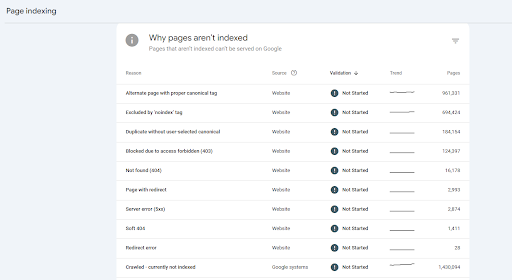
Step 1: Check Google Search Console
Identify:
- Crawled – not indexed
- Discovered – not indexed
- Alternate page with canonical tag
- Duplicate without a user-selected canonical
Step 2: Inspect URL
Use GSC’s URL Inspection Tool to see live indexing status.

Step 3: Check Canonicals & Sitemaps
Does the URL match the canonical?
Is it included in your sitemaps?
Step 4: Evaluate the Internal Linking Depth
Pages deeper than 3–4 clicks from the homepage struggle to index.
Step 5: Check Content Uniqueness
Thin, repetitive, or AI-blurred content often remains unindexed.
Step 6: Review Technical Signals
Test page fetch with Developer Tools → Network → Disable JS → Reload.
If content disappears, indexing will fail.
How to Fix Indexing Issues
1. Strengthen IA (Information Architecture)
Fix structure, clusters, and internal linking.
This directly improves indexing speed.
2. Fix Canonical Tag Conflicts
Make sure the canonical tag represents the preferred URL.
3. Resubmit Correct Sitemaps
Ensure your XML sitemaps reflect correct URLs, not redirects or noindexed pages.
4. Improve Page Quality
Add depth, experience signals, FAQs, multi-format content, and original insights.
5. Reduce Crawl Waste
Block faceted URLs, duplicates, tracking parameters, and outdated templates.
6. Add Internal Links to Orphan or Weak Pages
Use contextual anchors linking from strong pages.
7. Improve Technical Performance
Compress assets, preload key content, reduce JS dependencies.
EEAT Enhancement: What This Means for Your Business
If your website is facing indexing issues:
- You are losing visibility even if your content is high quality
- Google may be misunderstanding your structure or authority
- Small technical mistakes can delete entire keyword groups from SERPs
- Predictive SEO and IA improvements solve 80% of indexing problems
Based on our client work, resolving indexing issues leads to:
- Faster page discovery
- Higher crawl frequency
- Improved rankings
- Better topical authority
- More stable organic growth
Indexing issues are no longer a simple technical oversight; they are a structural and quality signal in 2026.
Google rewards websites that maintain clean architecture, strong internal links, accurate canonicals, and updated sitemaps.
If your pages aren’t indexing, it’s not a mystery; it’s a fixable system.
These findings are based on aggregated data from our 2024–2025 technical audit dataset across ecommerce, real estate, SaaS, and service websites. Results may vary depending on website size, CMS, server performance, and how frequently new URLs are generated. However, the underlying principles, strong IA, correct canonicals, clear crawl paths, and technical integrity consistently determine whether a page becomes eligible for indexing under Google’s AI-driven era.”
At Chapters Digital Solutions, we diagnose indexing issues through technical audits, IA optimization, and advanced crawling analytics to restore visibility and ranking potential.