


Technical SEO in 2026 isn’t just “fixing errors” or “making the site faster.”
It’s about building a website that:
- Can be crawled and indexed efficiently
- Loads fast enough to keep users (and Google) happy
- Is structurally clear for AI Overviews and generative search
- Scales without breaking when you hit 1,000+ pages
- Sends strong EEAT and entity signals
This technical SEO checklist is written as a hybrid:
- Simple enough for marketing teams and website owners
- Deep enough for SEOs and developers who want to go beyond basics
Use it as a living document for your dev, SEO, and content teams.
1. Crawlability & Indexing: The Foundation of All SEO
If Google can’t crawl or index your content properly, nothing else matters. This is always the first place to look when a site isn’t performing.
[✓] Check and clean your robots.txt
- Make sure you’re not accidentally blocking important sections (e.g. /blog/, /products/)
- Disallow only what truly shouldn’t be crawled:
- Admin URLs
- Internal search results
- Test / staging paths
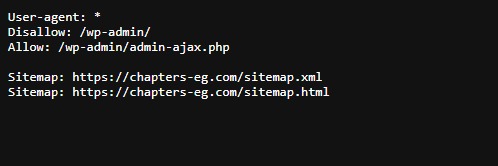
Also:
- Confirm there’s no old or duplicated robots.txt on different subdomains.
- Use the robots tester in Google Search Console to verify. (Side bar → Settings → robots.txt)
[✓] Ensure your XML sitemap is clean, accurate, and up to date
Your sitemap should:
- Include only 200-status, indexable URLs
- Exclude redirects, 404s, or noindex pages
- Be automatically updated when new content is published
- Be submitted in Google Search Console
- Use lastmod correctly for dynamic sites
- Be broken into smaller sitemaps if you have 10,000+ URLs
- Be reachable at /sitemap.xml
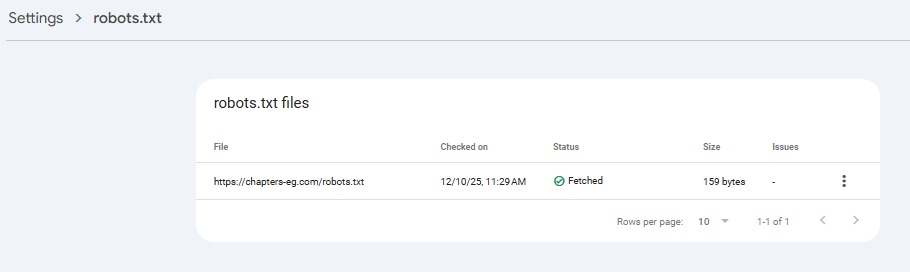
Check our own sitemap: https://chapters-eg.com/sitemap.xml
In many audits, we find that a lot of URLs inside sitemaps are either non-indexable or low-value pages. Cleaning this up improves crawl prioritization and reduces index waste.
[✓] Audit which pages are actually indexed
Use Google Search Console → Pages report for indexing issues:
- Look at:
- Indexed
- Crawled – currently not indexed
- Discovered – currently not indexed
- Check if important templates (blog posts, category pages, service pages) are missing.
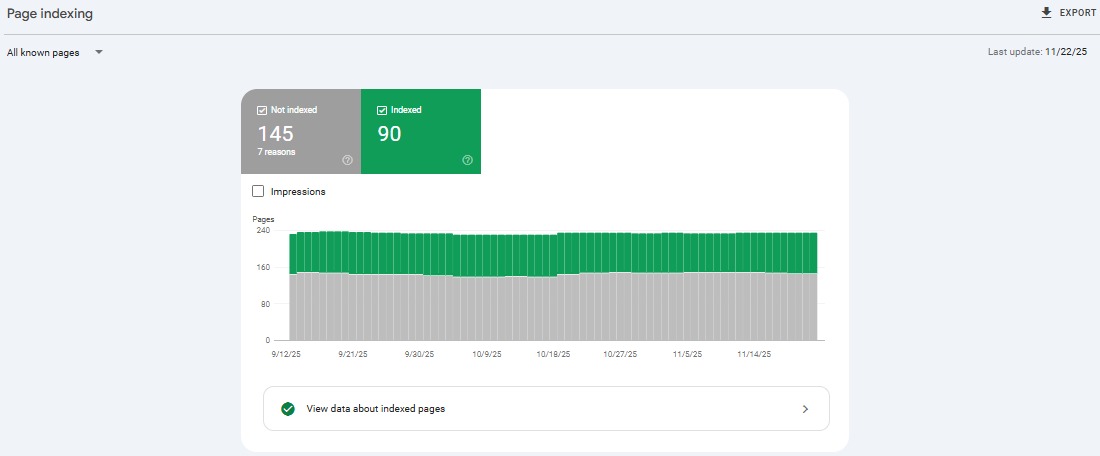
If a critical page isn’t indexed:
- Check internal linking (is it orphaned?)
- Check canonical tags (is it pointing somewhere else?)
- Check for noindex tags or HTTP headers
[✓] Fix “Discovered / Crawled – not indexed” patterns
When you see large volumes of:
- Discovered – currently not indexed
- Crawled – currently not indexed
…it often signals:
- Weak or duplicated content
- Thin category / tag pages
- Too many near-duplicates
- Faceted navigation creating noise
- Poor internal linking and crawl prioritization
You don’t need everything indexed. You need the right pages indexed.
[✓] Optimize crawl budget (especially 1,000+ URLs)
For large sites (e.g. Scalable SEO Architecture for 1,000+ Pages):
- Reduce low-value URLs:
- Over-tagging
- Faceted filters without control
- Duplicate parameter pages
- Use:
- noindex for thin utility pages
- disallow for junk paths in robots.txt
- Canonicals to consolidate near-duplicates
[✓] Run a log file analysis
If possible, work with your dev/hosting team to:
- Download server logs
- Check:
- Which URLs Googlebot hits the most
- Which important URLs are rarely crawled
- Crawl spikes / crawl waste patterns
We typically analyze logs using Screaming Frog Log File Analyzer or server-side access logs provided by the dev team. This allows us to pinpoint where Googlebot wastes crawl resources and which URLs it repeatedly ignores. This is an advanced step, but it’s how you get beyond surface-level crawling.
[✓] Fix orphaned pages & weak internal paths
Use a crawler (Screaming Frog, Sitebulb, etc.) to find:
- Pages with 0 internal links
- Pages more than 3–4 clicks from the homepage
2. Core Web Vitals & Performance: Crucial for Rankings & AI Overviews
Performance is no longer “nice to have.” It’s directly tied to rankings, user satisfaction, and even AI Overview visibility.
Google confirms that Core Web Vitals are used by its ranking systems and contribute to overall page experience signals. These metrics, measured at scale through the Chrome UX Report (CrUX), reflect how real users experience your website. Improving LCP, CLS, and INP helps strengthen both user engagement and search visibility.
[✓] Hit modern Core Web Vitals thresholds
Focus on:
- LCP (Largest Contentful Paint): aim for < 2.5s
- CLS (Cumulative Layout Shift): aim for < 0.1
- INP (Interaction to Next Paint): aim for < 200ms
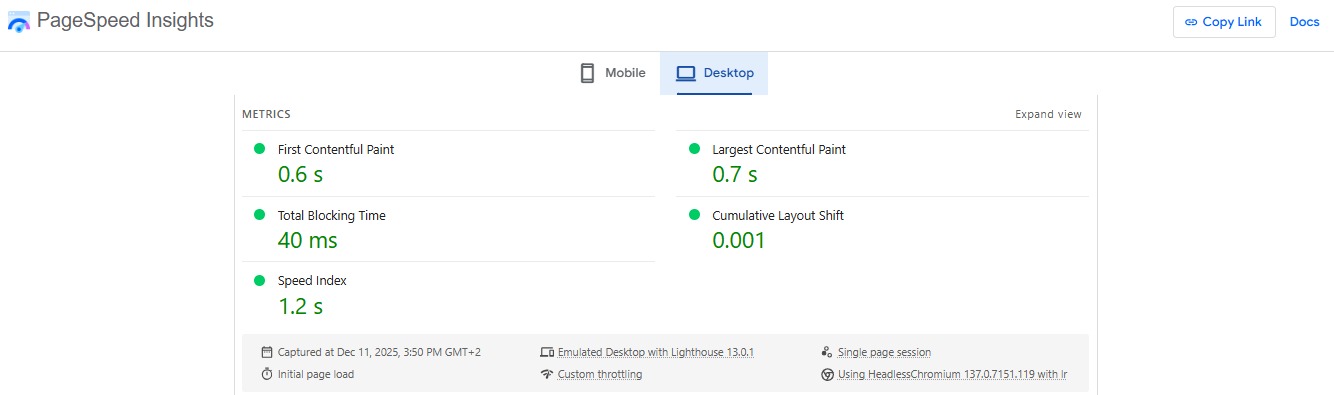
Check:
- PageSpeed Insights
- Chrome User Experience Report
- Google Search Console → Core Web Vitals
[✓] Reduce JavaScript bloat
Heavy JS kills performance and increases INP.
- Remove unused JS bundles
- Defer non-critical scripts
- Split large bundles
- Avoid unnecessary third-party scripts (e.g., unused trackers, widgets)
This is often one of the biggest real-world fixes we recommend in audits.
[✓] Optimize TTFB & hosting infrastructure
- Use fast, modern hosting
- Enable caching (server + CDN)
- Use a CDN if traffic is global or regionally distributed
- Monitor uptime and latency
A slow server can make an otherwise well-optimized page fail CWV.
[✓] Compress and modernize images
- Use WebP or AVIF formats where possible
- Compress images (target < 150–200 KB for most images)
- Use responsive images (srcset) for different devices
- Lazy-load below-the-fold images properly
3. Mobile-First UX & Page Experience
Most traffic is mobile. Google evaluates your site like a mobile user.
[✓] Test your site on real devices
Don’t rely only on tools:
- Navigate the site on a real phone
- Check:
- Menu behavior
- Tap targets
- Font sizes
- Forms and CTAs
If content is technically “responsive” but painful to use, you’re losing both users and ranking potential.
[✓] Check mobile usability in GSC
Use:
- Search Console → Experience → Page Experience / Mobile usability (depending on UI)
- Fix:
- Overlapping elements
- Text that’s too small
- Content wider than screen
[✓] Improve navigation and clarity
From a User Experience (UX) and SEO Information Architecture (IA) perspective:
- Keep navigation simple and predictable
- Use breadcrumbs
- Avoid deep nesting where users (and bots) get lost
- Surface important hubs in the main nav:
4. Website Architecture (IA): How Google Understands Your Site
Your website Information Architecture (IA) is how Google (and AI systems) understand:
- What your site is about
- Which pages are most important
- How topics relate to each other
[✓] Build clear topic clusters
Example:
- Cluster: Technical SEO
- Pillar: Technical SEO Checklist 2026 (This current blog)
- Supporting:
You will find that all these are topics related and support this blog with extra information that can be beneficial for the user reading this blog. Google rewards this if done without overuse. Do this for all major services and themes.
[✓] Limit click depth
- Important pages should be within 3 clicks of the homepage
- Use:
- Hubs
- Sidebars
- “Related content” modules
- Category pages
[✓] Use clean, logical URL structures
- example.com/blog/technical-seo-checklist-2026/ is better than example.com/post?id=7218
- Keep URL hierarchy aligned with your IA and expectations:
- /blog/digital-marketing/…
- /blog/seo/…
- /services/seo/
[✓] Use breadcrumbs
Breadcrumbs help:
- Users understand where they are
- Search engines contextualize a page within your IA
Add structured data (BreadcrumbList) for maximum benefit.
5. Structured Data & Entity SEO: The Language of AI Search
Structured data is now critical for semantic understanding, rich results, and AI Overviews.
[✓] Add the right schema types
For a site like Chapters, you likely need:
- Organization / LocalBusiness
- Article / BlogPosting
- Service
- BreadcrumbList
- FAQPage (where appropriate)
- Product (if applicable)
Ensure your main entity (brand) is consistently described across:
- Website
- Knowledge panel signals
- Profiles (LinkedIn, GMB, etc.)
[✓] Validate structured data regularly
Use:
- Rich Results Test
- Schema validators
- GSC → Enhancements reports
Fix errors, warnings, and keep markup updated.
[✓] Reinforce your brand as an entity
Across your site and content:
- Use consistent brand name and description
- Reference your location (e.g. Egypt, MENA) where relevant
- Highlight case studies, team expertise, about pages
6. AI Search Optimization (AIO & GEO): New Technical Requirements
2026 is the first real AI search era. Your content needs to be AI-friendly at a technical and structural level.
Google’s Search guidance on generative AI emphasizes creating helpful, people-first content with clear structure, accurate information, and strong expertise signals. While Google does not publish specific ranking formulas for AI Overviews, its documentation highlights the importance of high-quality, well-structured content, which aligns directly with the technical recommendations in this technical SEO checklist.
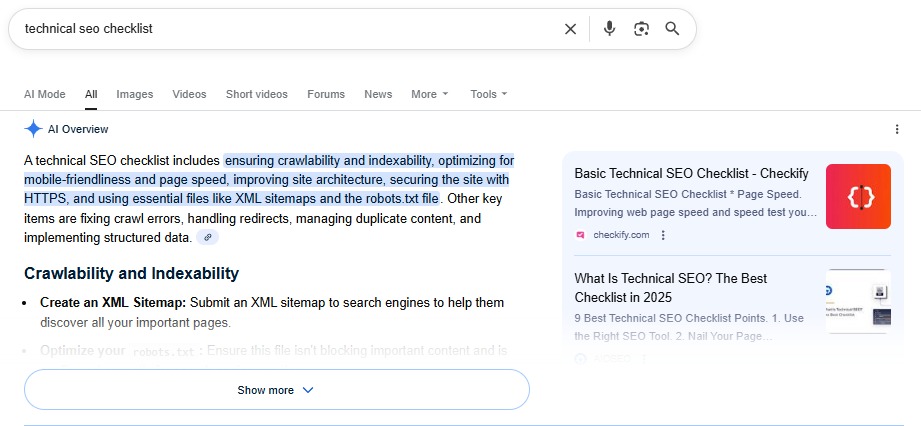
[✓] Structure content for AI extractability
- Use clear H2/H3 headings
- Use lists and tables
- Include short summaries near the top
- Answer “What is…”, “How to…”, “Why…” questions directly
This helps for:
- Featured snippets
- AI Overviews
- Other Generative Engine Optimization (GEO) opportunities
[✓] Include expert commentary & real experience
AI systems look for:
- Specifics
- Real-world scenarios
- Signals of Experience & Expertise
[✓] Tighten factual accuracy
Avoid:
- Ambiguous statements
- Outdated information
- Unverifiable claims
7. Index Hygiene & Duplicate Control
A messy index drags performance down.
[✓] Identify and fix duplicates
Use your crawler + GSC:
- Find:
- Duplicate titles
- Duplicate meta descriptions
- Same/similar content across URLs
Fix via:
- Canonical tags
- 301 redirects
- Consolidating thin content
[✓] Control faceted navigation & filters
For e-commerce / large catalogs:
- Decide which combinations should be indexable
- Use:
- noindex
- Canonicals
- Disallow rules to prevent infinite combinations.
[✓] De-index low-value pages
Consider noindex for:
- Thin tag pages
- Internal search results
- Outdated campaign pages (if not driving value)
Focus your index on pages that serve clear search intent.
8. JavaScript SEO: Make Sure Google Can See What Users See
JS frameworks can break SEO in ways that are not obvious.
[✓] Check rendered HTML
Use:
- “View source” vs “Inspect element”
- Mobile-friendly test / URL inspection’s rendered HTML
Make sure:
- Main content exists in the rendered HTML
- Critical metadata is visible (titles, canonicals, structured data)
[✓] Prefer SSR / hydration best practices
For React, Vue, Next, Nuxt, etc.:
- Prefer SSR or SSG where possible
- Avoid loading core content only after heavy client-side JS runs
- Keep hydration fast to avoid content invisible during initial load
9. Image, Video & Media Optimization
Media can be the biggest performance and UX killer.
[✓] Use modern formats & compression
- WebP / AVIF where supported
- Compress images via tools like TinyPNG, Squoosh, etc.
- Avoid using giant hero images as background when not needed
[✓] Lazy-load correctly
- Lazy-load below-the-fold images
- But don’t lazy-load critical LCP images
- Use native loading=”lazy” where appropriate
[✓] Optimize video embeds

- Use preview images
- Avoid auto-play with sound on
- Consider lightweight YouTube embed solutions
- Host critical brand videos where performance is acceptable (YouTube, CDN, etc.)
10. Security & Stability: Technical EEAT Signals
Google’s own documentation emphasizes that HTTPS and security headers are foundational ranking and trust signals. Sites with persistent mixed-content warnings often suffer from indexing fluctuations and reduced visibility.
[✓] Enforce HTTPS everywhere
- No HTTP versions
- No mixed content warnings
- Proper redirect rules from HTTP → HTTPS
[✓] Keep everything updated
- CMS
- Plugins
- Themes
- Dependencies
Outdated software = security risk = negative trust signal.
[✓] Add basic security headers
Consider:
- Content Security Policy (CSP)
- X-Frame-Options
- X-Content-Type-Options
Talk to your dev team about practical implementation.
11. Analytics, Monitoring & Diagnostics
Technical SEO is never “set and forget.”
[✓] Use GA4 + GSC as your base
- Track organic traffic and engagement
- Monitor index coverage
- Watch for sudden drops in clicks/impressions
[✓] Monitor SERP volatility & algorithm updates
- Use tools (Semrush, Ahrefs, Ubersuggest, etc.) to monitor volatility
- Compare your performance with industry swings
[✓] Add additional monitoring
Where possible:
- Uptime monitoring
- Log-based alerts for 404 spikes
- Core Web Vitals monitoring over time
12. Ongoing Maintenance & Governance
The biggest mistake brands make: They do a big technical cleanup once, and never revisit it.
We maintain a quarterly ‘Technical Governance Checklist’ for all long-term clients to ensure the site remains stable after new deployments, design changes, or content expansions. Most technical regressions occur after redesigns or plugin updates, not from neglect.
[✓] Run quarterly technical audits
- Crawl the entire site
- Compare changes against previous audits
- Reassess:
- Index coverage
- CWV
- IA health
- Internal linking
[✓] Review redirects & legacy content
- Remove or update old redirect chains
- Merge outdated thin content into stronger hubs
- Keep your main pillars fresh and updated
[✓] Align dev, SEO & content teams
Make sure:
- Dev teams know the SEO implications of changes
- SEO team has visibility on new features and templates
- Content team understands how IA and internal linking should work
This is where a strong process matters more than any one tool.
Technical SEO in 2026 Is About Systems, Not Checkboxes
This technical SEO checklist is based on years of technical audits performed by Chapters Digital Solutions across industries including real estate, e-commerce, healthcare, SaaS, and enterprise websites with 1,000–10,000+ URLs.
Technical SEO in 2026 is less about “fixing random issues” and more about building a system that keeps your site healthy as it grows.
If you:
- Get crawlability and indexing right
- Hit Core Web Vitals standards
- Build a solid SEO information architecture (IA)
- Optimize for AI and SEO (AIO & GEO)
- Maintain clean, secure, and monitored infrastructure
…you’ll be ahead of most competitors, even those who are still chasing quick fixes.