


In today’s digital landscape, user experience (UX) has become one of the most crucial factors for ranking well on search engines, especially Google. Google’s algorithms now focus heavily on metrics that measure how users interact with your site, rewarding websites that provide a seamless, efficient, and enjoyable experience. Understanding how UX SEO metrics like Core Web Vitals influence rankings is essential for marketers, SEO specialists, and web developers aiming to improve their visibility.
In this blog, we’ll explore how UX SEO impacts your rankings, why it matters, and how you can leverage UX design principles to enhance your website’s performance on search engines.
What is UX and Why It Matters for SEO
UX, or User Experience, refers to how users perceive and interact with a website or application. It’s not just about how a website looks, but how it works, how easy it is to navigate, and how satisfying the experience is from start to finish.
In SEO, UX matters because Google has made it clear that it uses UX signals as part of its ranking algorithm. If a user has a poor experience on your site for example, it takes too long to load or the content is hard to navigate. Google will likely rank your site lower, regardless of the quality of your content.
Having user experience consultants or experts can help assess and optimize your website’s usability to align it with what users expect and what search engines reward. Key areas of focus for a user experience consultant include:
- Navigation and accessibility
- Load speed
- Mobile optimization
By understanding UX SEO, businesses can better optimize their websites to meet user expectations and improve their ranking potential.
The Core Web Vitals: Key UX Metrics That Impact SEO
Google’s Core Web Vitals are a set of user experience metrics that directly influence rankings. They focus on page load time, interactivity, and visual stability. Factors that affect how users interact with a website. Here’s a closer look at the Core Web Vitals that matter most:
Largest Contentful Paint (LCP): Page Load Speed
LCP measures the time it takes for the largest visible element on a page (e.g., images, videos, or text) to load. A slow LCP results in frustrated users and a higher bounce rate, negatively affecting rankings.
- Google’s target for LCP is 2.5 seconds or less.
- If your page takes longer, users are more likely to leave before engaging, which can harm both user satisfaction and SEO.
Cumulative Layout Shift (CLS): Visual Stability
CLS measures how much a page layout shifts as it loads. If images, buttons, or content move unexpectedly, it disrupts the user’s experience and can lead to frustration.
- Google’s target for CLS is 0.1 or less.
- Reducing layout shifts improves the user experience, especially on mobile devices where page elements shift more easily.
First Input Delay (FID): Interactivity
FID measures the time it takes for a page to become interactive after the user clicks on a link or button. Delayed interactivity can frustrate users, leading to a higher bounce rate.
- Google’s target for FID is 100 milliseconds or less.
- Optimizing for fast interactions ensures a smooth and engaging experience for users.
These Core Web Vitals are now a crucial part of SEO, and Google uses them to rank websites based on how well they deliver a positive user experience.
How UX Design Principles Affect Rankings
User experience (UX) design principles are the foundation of creating a positive user experience that aligns with technical SEO best practices. Let’s explore a few UX design principles that have a direct impact on SEO rankings.
Mobile-First Design
Google prioritizes mobile-friendly websites due to the mobile-first indexing approach. Websites that aren’t optimized for mobile devices are penalized in search rankings. A responsive mobile design ensures users can easily navigate your site regardless of device.
User-Centric Content
Content should be designed with the user in mind, meaning it should be easy to find and consume. Long, difficult-to-read text, hidden calls-to-action (CTAs), and cluttered layouts hurt user experience and can lead to high bounce rates. Instead:
- Break content into digestible sections.
- Use headlines, bullet points, and visuals to enhance readability.
Accessibility and Intuitive Navigation
A clear, easy-to-follow navigation system ensures users can find what they need without frustration. Implementing breadcrumb navigation, providing search functionality, and offering clear categories all contribute to a smooth UX that can improve SEO rankings. Proper SEO Information Architecture ensures that your site’s structure is optimized for both search engines and users.
The Role of Behavior Signals in SEO Ranking
Google doesn’t just look at technical factors like page speed and mobile-friendliness, it also considers how users behave once they land on your site. Behavior signals like bounce rate, time on page, and scroll depth indicate how engaged users are with your content.
- Bounce rate: A high bounce rate (users leaving quickly) signals poor user experience and low engagement, which can negatively affect your SEO.
- Time on page: If users are spending more time on your page, it shows that they find your content useful and relevant, positively impacting rankings.
- Scroll depth: If users are scrolling through your content, it signals that your page is engaging and meets user needs, which can boost SEO.
By improving the overall user experience and providing content that meets users’ expectations, you can increase engagement and reduce bounce rates, both of which play a key role in improving SEO rankings.
How to Improve UX for Better SEO
Improving UX for better SEO is about making sure your website delivers a fast, engaging, and accessible experience. Here are some tips to enhance UX:
- Optimize page load speed: Use image compression, minimize JavaScript, and leverage browser caching.
- Simplify navigation: Reduce unnecessary menu items, use clear labels, and ensure users can find their desired content in three clicks or less.
- Optimize for mobile: Ensure your website is fully responsive and easy to navigate on all screen sizes.
- Improve readability: Use short paragraphs, subheadings, and bullet points to make your content more scannable.
- Implement accessible design: Ensure that your website is accessible to all users, including those with disabilities. Use proper contrast, provide alternative text for images, and ensure your site is keyboard-navigable.
A Real-World UX SEO Example: Perfect Smile
At Chapters Digital Solutions, we recently worked with Perfect Smile, a dental center offering advanced solutions like dental implants, to enhance both their user experience (UX) and SEO performance.
When we started the project, Perfect Smile’s website had several areas for improvement, especially on their service pages and the overall navigation structure. We focused on several key areas to optimize the website for better user engagement and improved SEO performance.
Key UX Improvements:
- Header Optimization
The main header was restructured to ensure clarity and ease of navigation. We streamlined the menu and made it more user-friendly, ensuring users could easily find critical services like Dental Implants and Contact Information. The header now effectively guides users without overwhelming them, offering quick access to essential information. - Effective CTA Integration
We strategically placed Calls-to-Action (CTAs) in key areas, such as:- Service pages (clear CTAs prompting users to book consultations or learn more).
- Blog articles (inviting readers to schedule an appointment).
- At the end of each blog post and throughout the service pages (ensuring conversion paths were simple and direct).
- Optimized Contact Forms
To make it easier for users to get in touch, we optimized the contact form placement on various pages, ensuring it’s prominently visible without disrupting the user experience.
These are Visuals of the new header design and CTA placements to get an idea of what we are mentioning:


Impact on Metrics:
Following these UX optimizations, Perfect Smile saw substantial improvements in key metrics that directly impact conversions:
- WhatsApp messages increased by 11%: Users found it easier to reach out via messaging, resulting in more immediate consultations.
- Phone calls increased by 40%: A direct impact of placing CTAs more effectively, prompting users to call for appointments.
- Form Starts increased by 111.76%: Overall user interactions improved, leading to more users filling forms, booking appointments, and engaging with the website.
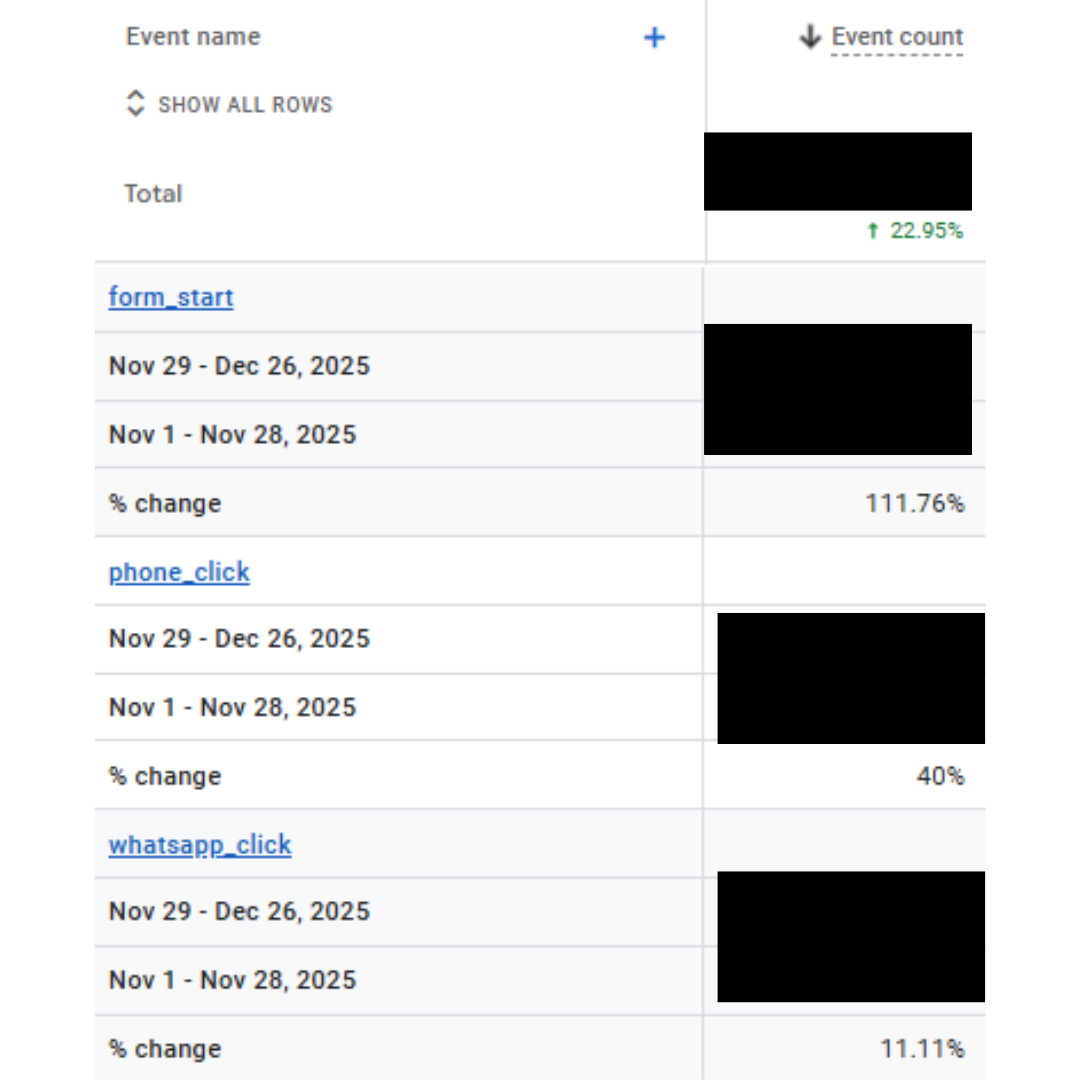
These improvements didn’t just lead to a better user experience; they also drove tangible results in terms of business outcomes. Check out the full Perfect Smile SEO case study.
Potential Limitations of UX SEO Metrics
While UX metrics such as Core Web Vitals are undeniably important for ranking, it’s essential to understand their limitations to ensure a balanced approach to SEO. Here are a few considerations:
1. Not the Only Ranking Factor
While Google and other search engines prioritize UX signals, they don’t prioritize UX above all other factors. Content quality, backlink profile, and overall site authority are still major components of SEO success.
In practice, we’ve seen cases where sites with poor UX but high-quality content and strong backlinks continue to rank well, despite lacking a stellar user experience.
Example: A news website might have slow load times or a cluttered design but continue to rank high due to its authoritative content and frequent updates.
2. Overemphasis on Speed
Many businesses focus almost exclusively on speed when optimizing UX SEO metrics, but speed isn’t the only factor that impacts user experience. For example, a site that loads extremely fast but lacks intuitive navigation or mobile responsiveness may still frustrate users, resulting in higher bounce rates.
Data point: In some of our recent audits, we found that websites with excellent page load speeds but poor navigation experienced no improvement in conversion rates, proving that user experience is about more than just speed.
3. Variation Across Devices
UX metrics can differ widely across devices. A website may perform perfectly on desktop but poorly on mobile, which can negatively impact rankings. The shift to mobile-first indexing means that if your site isn’t optimized for mobile, it could see a drop in rankings even if desktop UX is flawless.
Example: A client with a well-optimized desktop site saw a significant drop in mobile rankings after we identified that their mobile version was slow and difficult to navigate.
4. SEO vs. User Experience Conflict
In some cases, SEO best practices and user experience best practices can conflict. For example, SEO often requires optimized keyword usage and text-heavy content, which can make the design less visually appealing or harder to navigate. While users want clean, minimalistic designs, SEO often demands more content density for keyword relevance.
Tradeoff example: One of our clients had a text-heavy landing page optimized for SEO, but it created a cluttered UX, which led to higher bounce rates. In such cases, the challenge is finding the balance between user-friendly design and SEO demands.
5. Dependence on Third-Party Tools
Although tools like Google PageSpeed Insights and Lighthouse provide useful data for measuring UX metrics, they can’t always predict real user behavior. These tools don’t account for all factors that affect UX, such as emotional response or how users interact with the content. As a result, UX optimizations based solely on these metrics might not always align with actual user preferences.
Elevating UX for Better SEO and Conversions
In 2026, UX SEO is no longer a luxury, it’s a necessity. Search engines, especially Google, are increasingly prioritizing user experience metrics like Core Web Vitals as ranking factors. To stay competitive, brands must optimize for:
- Mobile-first design
- User-centric content
- Fast page load speeds
- Clear navigation and accessibility
By focusing on building optimized website UX, businesses can enhance their search rankings and provide a better experience for users. The key to succeeding in SEO is clear: when user experience improves, rankings follow.