


In modern SEO, rankings alone no longer explain performance.
As search engines become increasingly behavior-driven, understanding how users interact with your pages has become a critical competitive advantage. This is where heatmaps SEO emerges as a powerful layer of insight, bridging the gap between traffic acquisition and real user experience.
At Chapters Digital Solutions, we’ve seen a consistent pattern across industries like e-commerce, SaaS, medical, and real estate: Pages optimized with behavioral insights outperform pages optimized only for keywords.
In this guide, we’ll break down how heatmaps + SEO work together, how to use heat map analysis to uncover ranking risks and growth opportunities, and how tools like Hotjar can directly influence organic performance.
What Are Heatmaps in SEO?
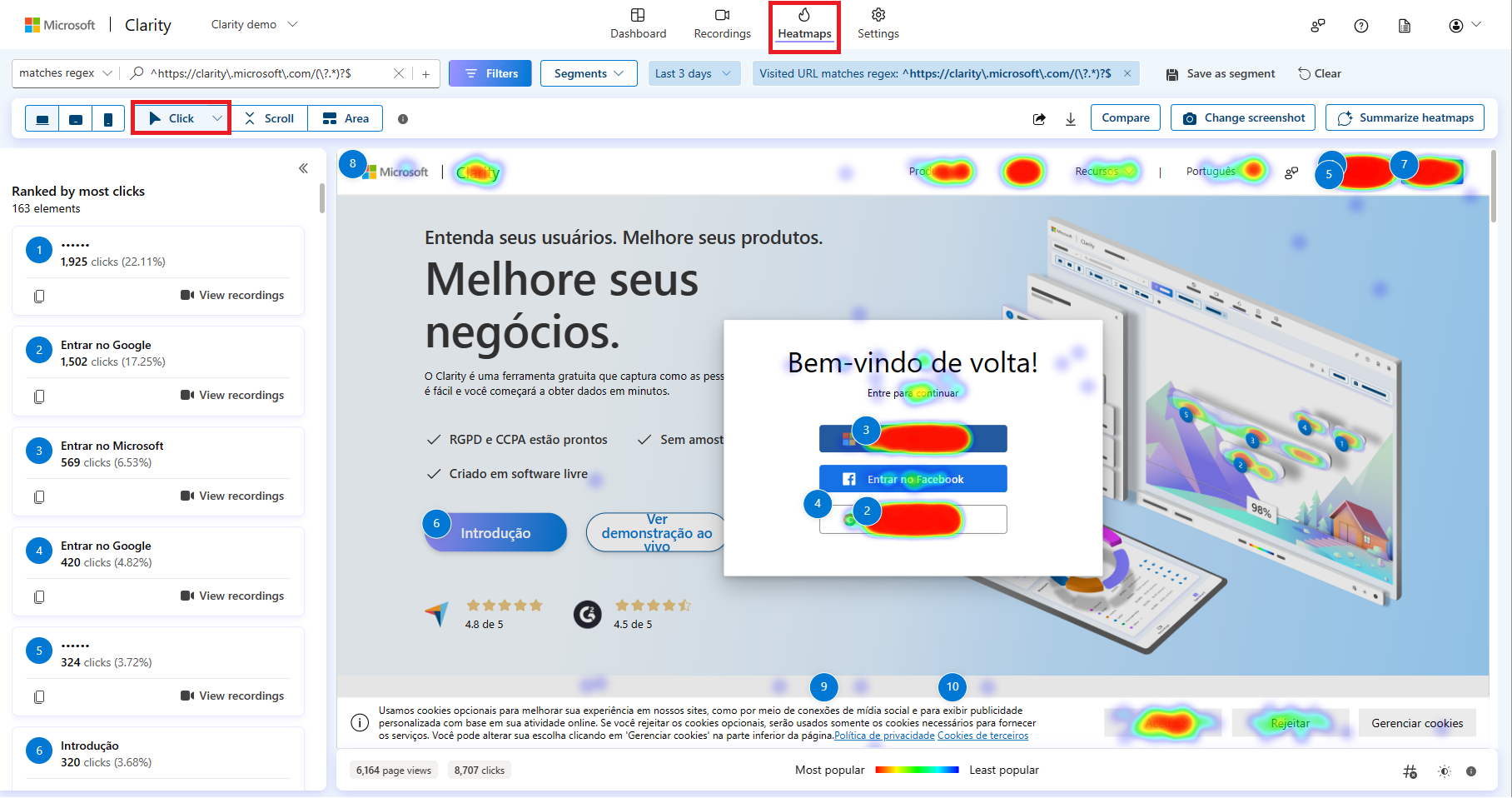
A heatmap is a visual representation of user behavior on a webpage. Instead of relying on abstract metrics, heatmaps show you where users click, scroll, pause, and abandon.
From an SEO perspective, heatmaps help answer questions that analytics alone cannot:
- Are users engaging with the content Google ranks?
- Do visitors reach the sections optimized for target keywords?
- Are internal links actually being clicked?
- Where does attention drop off?
When applied correctly, heatmaps SEO transforms SEO from traffic optimization into experience optimization.
Why Heatmaps Matter More for SEO in 2025+
Search engines don’t rank pages in isolation. They evaluate post-click behavior to determine whether a page satisfies user intent.
While Google doesn’t publicly confirm specific engagement signals as ranking factors, modern ranking systems, including Helpful Content and AI-driven SERPs, clearly reward pages that:
- Maintain user attention
- Reduce pogo-sticking
- Satisfy intent efficiently
- Encourage meaningful interaction
Heat map analysis gives SEO teams visibility into these behavioral signals before rankings decline.
Types of Heatmaps Used in SEO Analysis
Not all heatmaps serve the same purpose. For SEO, each type reveals different optimization opportunities.
1. Click Heatmaps
Click heatmaps show where users interact most.
SEO insights:
- Identify ignored internal links
- Detect misleading CTAs
- Reveal “dead zones” above the fold
- Validate link placement for SEO authority flow
2. Scroll Heatmaps
Scroll maps show how far users scroll down a page.
SEO insights:
- Are users reaching H2/H3 sections?
- Is important content buried too low?
- Does content depth align with engagement?
If users don’t reach optimized sections, rankings may eventually decline, regardless of keyword targeting.
3. Move & Attention Heatmaps
These track cursor movement and dwell patterns.
SEO insights:
- Identify confusing sections
- Detect cognitive friction
- Understand content scanning behavior
Heatmaps SEO vs Traditional Analytics
Traditional SEO tools tell you what happened. Heatmaps show why.
| Metric | Analytics Tools | Heatmaps |
| Traffic drops | Yes | No |
| Engagement depth | Limited | Visual & precise |
| UX friction | No | Yes |
| Content visibility | Assumed | Proven |
| CTA interaction | Aggregated | Exact |
This is why we treat heatmaps as a behavioral layer that complements GA4, Search Console, and keyword tools, not replaces them.
How Heat Map Analysis Improves SEO Performance
1. Content Optimization Based on Real Attention
Many pages rank but fail to convert or retain users.
Using scroll heatmaps, we often find:
- Key answers are placed too low
- Overlong introductions
- Poor content hierarchy
By restructuring content around attention hotspots, we’ve improved:
- Engagement rate
- Time on page
- Long-term ranking stability
2. Internal Linking That Actually Works
Internal links are an SEO cornerstone, but only if users interact with them.
Heatmaps reveal:
- Links users expect but don’t find
- Links are placed where users never scroll
- Anchor text that fails to attract clicks
This insight allows SEO teams to improve internal link effectiveness and strengthen topical authority.
For performance measurement, these insights pair directly with CRO metrics to quantify impact.
3. Reducing Pogo-Sticking and Bounce Risk
Heatmaps expose early abandonment signals:
- Users clicking back immediately
- Skipping key sections
- Ignoring hero messaging
Fixing these issues reduces pogo-sticking, a strong quality signal in competitive SERPs.
Hotjar Examples: Heatmaps in Action
Hotjar is one of the most widely used tools for heat map analysis in SEO and CRO.
Here are real-world Hotjar use cases we frequently apply:
Example 1: Blog Content Optimization
A long-form blog ranked on page 1 but underperformed.
Hotjar scroll maps revealed:
- Only 42% of users reached the core answer
- Users dropped before the H2 sections
Fix:
- Shortened intro
- Added summary block above the fold
- Improved content scannability
Result: Higher engagement and improved keyword stability.
Example 2: Service Page SEO
Click heatmaps showed users clicking non-clickable icons and images.
Fix:
- Converted visual elements into navigational links
- Clarified CTAs
- Reduced confusion
Result: Improved UX, higher engagement, and better organic conversion paths.
Example 3: Internal Linking Strategy
Hotjar revealed that sidebar links were ignored, while in-content links performed 3x better.
Fix:
- Shifted internal links into content flow
- Aligned anchors with user intent
Result: Stronger crawl paths and improved page authority distribution.

Trust Psychology: Why Heatmaps Influence SEO Indirectly
SEO success isn’t just technical SEO; it’s psychological.
Trust psychology explains why users engage, stay, and convert:
- A clear structure builds confidence
- Predictable layouts reduce cognitive load
- Visual hierarchy guides attention
- Familiar patterns increase trust
Heatmaps show where trust breaks:
- Users hesitate
- Scroll erratically
- Ignore CTAs
- Abandon mid-content
By fixing trust leaks, you improve:
- Engagement
- Brand perception
- Conversion likelihood
- Long-term SEO resilience
Search engines reward pages that users trust, because trust translates to satisfaction.
How to Integrate Heatmaps into Your SEO Workflow
At scale, heatmaps should not be random experiments. They must be systematic.
Step 1: Prioritize High-Impact Pages
Focus on:
- High-traffic pages
- Declining rankings
- Conversion-critical pages
Step 2: Map Heatmap Insights to SEO Metrics
Connect heatmap behavior to:
- Engagement rate
- CTR changes
- Keyword performance
- Internal link interaction
Step 3: Test, Iterate, Scale
Use insights to:
- Adjust content layout
- Improve internal linking
- Refine CTAs
- Optimize UX elements
Common Mistakes When Using Heatmaps for SEO
- Analyzing too few sessions
- Ignoring device segmentation
- Treating heatmaps as CRO-only
- Making changes without SEO context
- Failing to connect insights to rankings
Heatmaps must support SEO goals, not exist in isolation.
Heatmaps SEO: The Competitive Advantage Most Brands Miss
Most brands still optimize for:
- Keywords
- Metadata
- Backlinks
Very few optimize for behavior. That’s why heatmaps SEO is a differentiator.
When you understand how users actually experience your content, you can:
- Prevent ranking drops
- Increase engagement
- Strengthen authority
- Improve conversion outcomes
Heatmaps + SEO = Smarter Optimization
SEO is no longer just about visibility; it’s about experience validation. By combining heatmaps, behavioral analysis, and SEO strategy, brands gain clarity that keyword tools alone cannot provide.
At Chapters Digital Solutions, we integrate heat map analysis into advanced SEO frameworks to help businesses turn traffic into engagement, trust, and revenue. If your SEO strategy doesn’t account for how users behave after the click, it’s incomplete. And in competitive SERPs, incomplete strategies don’t win.