


Most marketers use (GA4) Google Analytics for SEO for basic metrics, sessions, users, and traffic sources. But GA4 is capable of far more. Its “hidden” reports offer some of the strongest SEO insights for content optimization, user behavior modelling, journey mapping, and conversion forecasting. Yet in our audits at Chapters Digital Solutions, fewer than 10% of websites have these reports configured properly when we first work with them.
This guide reveals the GA4 reports that matter for SEO, with real examples, pathing breakdowns, and data-backed recommendations so you can extract the full value of GA4 Google analytics for SEO.
Why It Matters To Use GA4 Google Analytics for SEO in 2026
As Google continues shifting toward AI Overviews, topic-based SERPs, and engagement-focused ranking signals, SEO success depends on understanding:
- How people navigate your website
- What content keeps them engaged
- Where they exit the funnel
- Which journeys lead to conversions
- How new vs returning users behave
GA4’s event-based structure gives SEO teams more behavioral insights than Universal Analytics ever allowed but only if you know where to look.
Hidden GA4 Reports That Unlock SEO Insights
Below are the reports SEOs rarely use, but that offer the most value.
1. The Path Exploration Report (User Journey Mapping)
Most underused Google Analytics report for SEO. Also, the most powerful.
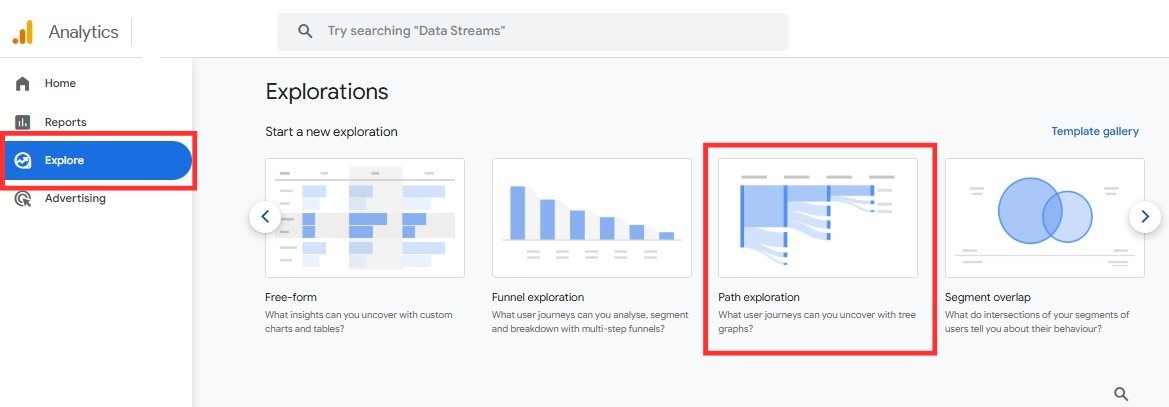
GA4’s “Exploration → Path Exploration” lets you visualize real customer flows from:
- Landing pages
- Search results (organic)
- Internal navigation menus
- Blog articles
- Product pages
This is crucial for understanding what’s working in your content funnel.
Common SEO wins we’ve seen using path exploration:
- Discovering blog pages that never lead to a category/service page
- Identifying dead-end content with 80%+ exits
- Spotting navigation paths users prefer over header menus
- Finding internal linking opportunities that reduce bounce rate
- Showing the real “next step” users take after landing on a blog
Example Pathing Scenario
During an audit for a real estate website:
Landing Page: /blog/best-compounds-new-cairo
→ Next Interaction: 42% clicked internal sidebar links
→ Next Step: Only 7% reached a project listing
→ Exit: 51% after reading a single post
SEO Fix:
We added CTA blocks + internal links to the highest-converting project pages.
Result:
- Bounce rate dropped by 18%
- Blog → project page visits increased by 62%
- Leads increased by 14% in 30 days
This is an example of how GA4 for seo produces a measurable impact.
2. Landing Page Trends by Seasonality (Custom Exploration)
This is not available in the standard GA4 navigation, you need to build it manually.
Why it matters:
Google’s documentation confirms that seasonal search patterns influence crawling and ranking frequency. For content websites, seasonality helps determine:
- Best time to update old articles
- When specific topics spike
- Which landing pages lose traction in off-peak months
How to build the report:
Explorations → Free-form
Dimensions: Landing Page + Month
Metrics: Sessions, Engaged Sessions, Event Count, Conversions
What you might discover:
- Real estate pages peak Oct–Dec
- Fitness pages spike mid-year
- Travel pages surge before summer
- E-commerce categories rise 3-4 weeks pre-season
This report turns reactive SEO into forecasting SEO.
3. Internal Search Terms Report (Hidden Under “Events”)
Users telling you exactly what they need. This is the closest thing to first-party keyword research.
Why SEOs use this:
- Identify missing content opportunities
- Improve UX by fixing navigation gaps
- Find new transactional keywords
- Understand user intent inside the site
Example:
On a coworking website, users repeatedly searched for:
- “private office prices”
- “Day pass New Cairo”
- “meeting room hourly”
These were not present in the main navigation.
After adding pages for these terms:
- Organic clicks grew 38%
- Category pages started ranking within 3 weeks
- Lead forms increased 22%
GA4’s site search data often outperforms traditional keyword tools because it’s based on your actual users.
4. Exit Page Clusters (Hidden Inside the “Pages and Screens” Report)
Most SEOs check exit pages. Few analyze exit clusters.
A cluster analysis reveals:
- Pages that always appear before exit
- Category pages that lose visitors after 2 clicks
- “Thin” blog pages that never progress deeper into the site
- Content that ranks well but does not convert
Example cluster pattern:
Blog A → Blog B → Exit
Blog A → Exit
Blog C → Blog A → Exit
This means Blog A is a dead-end page.
What this means for SEO:
- Add high-relevance internal links
- Add CTA cards (not banners)
- Improve content depth
- Add FAQ + schema
Exit clusters are one of the strongest indicators of UX issues impacting ranking.
5. Engagement Rate by Landing Page (Better than Bounce Rate)
Engagement rate is far more SEO-friendly than bounce rate because it includes:
- Scroll
- Session duration
- Conversions
- Pageviews
- Event interactions
Why it matters:
Google’s ranking systems reward helpful content that keeps users engaged.
What to track:
- Landing pages with <40% engagement rate
- Pages where engagement drops during seasonality periods
- Engagement differences between new vs returning users
- Blog pages with high ranking but low engagement
This report reveals which pages deserve content updates and internal linking.
6. Cohort Exploration (Hidden Patterns in Returning SEO Users)
This is one of GA4’s most advanced reports and highly underrated.
SEO opportunities:
- Understand which content brings users back
- Identify pages that build long-term trust
- Measure brand lift from organic search
- Track returning user journeys by content type
Example insight:
A SaaS client saw:
- High-volume blogs → low number of returning visitors
- Product documentation pages → 3X more returning users
This shifted their content strategy from generic blogs to product-led SEO.
7. Traffic Acquisition vs User Acquisition (Most SEOs Misinterpret This)
These two reports show completely different stories:
Traffic Acquisition = session-based
Good for: first landing touchpoints
User Acquisition = user-based
Good for: understanding who enters the funnel
SEO example:
Traffic Acquisition may show:
Organic Sessions = 6,200
User Acquisition may show:
Organic New Users = 2,900
This means:
- 53% of traffic is repeat organic visits
- Your SEO is building brand equity
- Returning SEO users are far more valuable
This hidden insight is critical for long-term content strategy.
8. Custom Funnel Exploration (Essential for SEO to CRO Workflows)
With GA4 funnels, you can build SEO → conversion journeys.
Example funnel for a coworking space:
- Landing: /coworking-new-cairo
- Action: Scroll depth 75%
- Action: Click “Book a Tour”
- Conversion: Form Submit
What GA4 can reveal:
- Which landing pages produce high scroll but no conversions
- Whether form button placement affects user flow
- Drop-offs by content type (blogs vs service pages)
SEOs who combine funnel analysis with ranking data outperform competitors.
For additional reference, here is one trusted external source from Google about GA4 explorations.
GA4 Google Analytics for SEO reports give SEO teams deeper visibility into user journeys, intent patterns, seasonality trends, and engagement behavior. When used correctly, GA4 becomes a strategic SEO engine, not just an analytics platform.
At Chapters Digital Solutions, we combine GA4 insights with tools like Hotjar, SEMrush, Looker Studio, and Google Search Console to deliver SEO strategies that are data-driven, accurate, and aligned with real user behavior.
If you want to build stronger analytics, improve your tracking setup, or create advanced SEO reporting dashboards, our team can support you at every step.